Managing a single Azure Kubernetes Service (AKS) cluster is a solved problem. You set up your control plane, configure your node pools, deploy your YAML manifests, and you are good to go.But what happens when your organization grows? Suddenly, you are managing 10, 50, or 200 clusters across multiple geographic regions, distinct Azure subscriptions, and hybrid cloud environments. Manual updates become a ticking time bomb. Keeping configurations in sync feels like chasing ghosts.
Azure Kubernetes Fleet Manager (Fleet).
What is Azure Kubernetes Fleet Manager?
At its core, Azure Kubernetes Fleet Manager is an Azure Resource Manager (ARM) service designed to solve the management problem of multi-cluster Kubernetes environments. It establishes a centralized Hub-and-Spoke topology to govern your entire Kubernetes footprint from a single pane of glass.
The Architectural Blueprint
To understand Fleet, you must understand its three foundational components:
- The Fleet Resource: The top-level grouping entity within ARM. It serves as the administrative umbrella for your clusters.
- Member Clusters: The individual “worker” Kubernetes clusters joined to your Fleet. While they must share the same Microsoft Entra tenant, they can span completely different Azure regions, subscriptions, or resource groups.
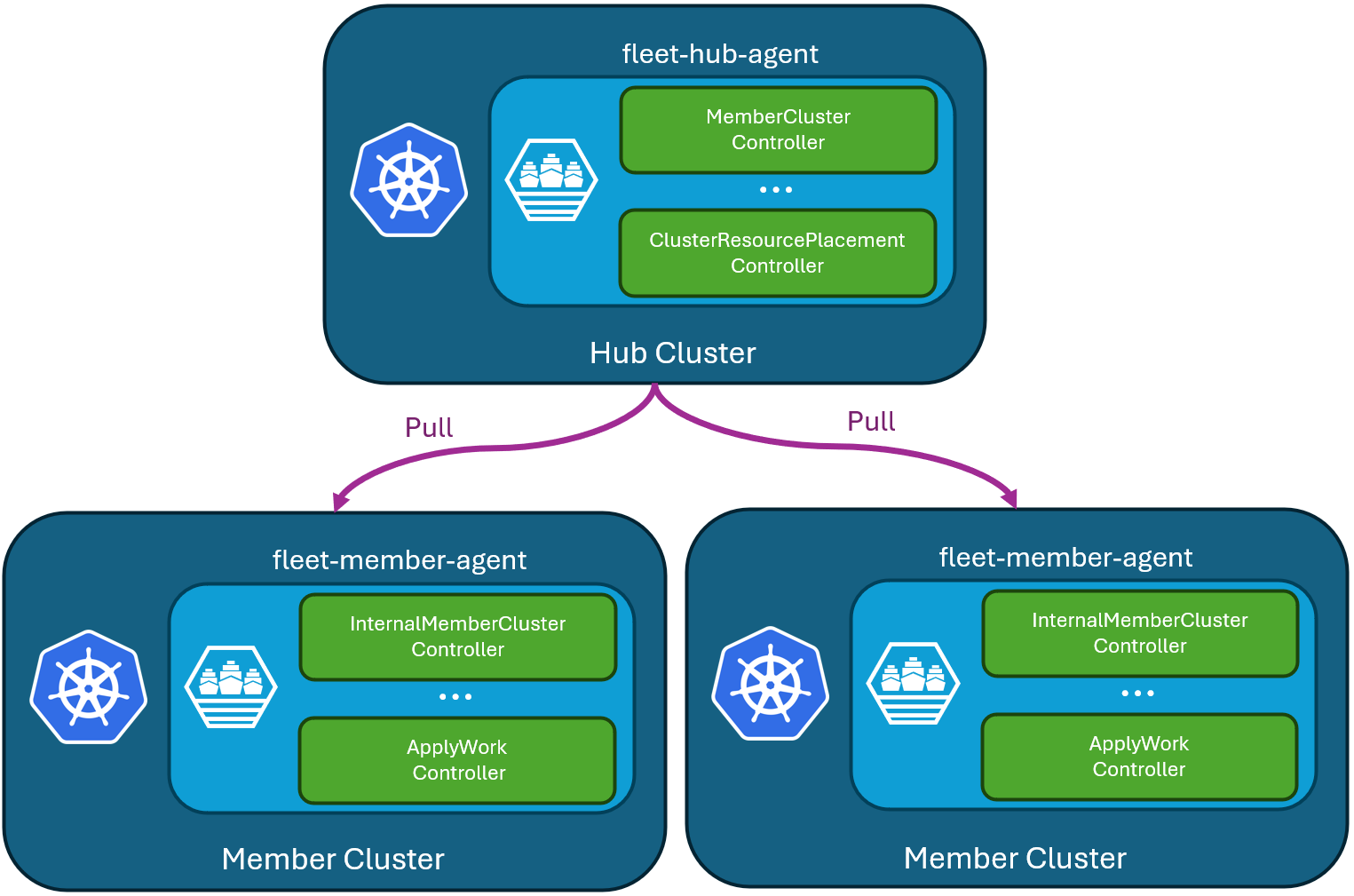
- The Hub Cluster: A fully managed, specialized, single-node AKS cluster provisioned automatically by Microsoft. It acts as the central command center, hosting the control plane engines required to broadcast commands down to your member clusters.
The Underlying Engine: KubeFleet.
When you enable a Hub cluster, Azure provisions an open-source framework called KubeFleet. This framework establishes a secure, asynchronous communication loop via two critical software agents:
fleet-hub-agent: Runs directly on the Hub cluster. It monitors your configuration changes and generates Kubernetes Custom Resources (CRs) representing your desired global state.fleet-member-agent: Dynamically injected into each member cluster. It continuously phones home to the Hub via an encrypted connection, pulls down the latest CRs, and applies them locally to the member cluster’s individual control plane.
Organizing Infrastructure: Labels and Taints
To control where workloads land and how configurations target specific infrastructure, Fleet relies on metadata tagging:
- Labels: Key-value pairs used by Fleet’s internal scheduling engine for Workload Placement. You tag clusters (e.g.,
environment: productionorregion: eastus) so the Hub knows exactly where to distribute apps. Note: You cannot modify these labels directly via kubectl on the Hub; you must use the Azure CLI (az fleet member update) or ARM REST API. - Taints: Used to repel workloads. If you apply a taint with a
NoScheduleeffect to aMemberClusterresource, the Fleet scheduler will actively bypass that cluster during global application deployments unless explicitly tolerated.
Architectural Choices: To Hub or Not to Hub?
When provisioning an Azure Fleet Manager resource, you face your first major architectural decision: choosing your Hub Cluster Mode. This choice fundamentally changes what your Fleet can do and how much it costs.
| Capability / Dimension | Fleet Manager WITHOUT Hub Cluster | Fleet Manager WITH Hub Cluster |
| Control Plane Host | None (Purely an ARM grouping metadata object). | Managed AKS cluster hosting KubeFleet. |
| Upgrade Management | ✅ Upgrades Kubernetes versions & node images. | ✅ Upgrades Kubernetes versions & node images. |
| Workload Propagation | ❌ No resource deployment features. | ✅ Intelligent multi-cluster resource placement. |
| Network Governance | ❌ No cross-cluster networking. | ✅ Managed Namespaces & DNS Layer-4 Load Balancing. |
| Financial Cos | Free tier (No cluster infrastructure cost). | Paid standard tier (Billed for the single-node AKS Hub). |
| Infrastructure Locks | N/A | Read-Only Lock. User-initiated mutations to the Hub’s underlying VMs or system components are blocked. |
The Lifecycle Point of No Return.
As a platform engineer, you must plan your infrastructure lifecycle carefully. You can upgrade a Hubless Fleet into a Fleet with a Hub cluster at any time to unlock advanced networking and propagation features. However, you cannot downgrade a Hub-based Fleet back to a Hubless Fleet. If you want to go back, you must delete the entire Fleet resource and re-enroll your member clusters.
Operational Lifecycles: Safe Multi-Cluster Upgrades.
Upgrading Kubernetes versions or OS node images across dozens of clusters is a high-risk operation. One bad configuration can cause a cascading outage across your global infrastructure. Fleet Manager mitigates this risk by replacing manual upgrades with orchestrated Update Runs and reusable Update Strategies.
The Upgrades Execution Hierarchy
Fleet breaks down mass infrastructure updates into three manageable layers:
- Update Groups: A logical collection of member clusters targeted to be upgraded at the exact same time. For example, you might place all non-critical development clusters in Region A into
Group-Dev-East. - Update Stages: A collection of Update Groups executed sequentially. Stage 1 executes. Only when Stage 1 completes successfully will the system transition to Stage 2.
- After-Stage Wait Time (Soak Time): A mandatory, user-defined pause injected immediately after a stage finishes. This allows your monitoring tools (like Azure Monitor or Datadog) to verify system stability and run automated integration tests before the upgrade touches the next tier of clusters.
Enterprise Guardrails: Approval Gates
For maximum operational safety, Fleet allows you to integrate manual or automated approval gates between groups or stages. If a minor Kubernetes API change breaks a microservice in your staging tier during Stage one, the approval gate will halt the automated run. The upgrade is blocked from ever reaching your production clusters, entirely containing the blast radius.
Multi-Cluster Integration: Handling Heterogeneous Environments.
Enterprise infrastructure rarely lives inside a single, pristine public cloud silo. Real-world platforms are messy—combining native Azure environments with on-premises data centers, edge environments, and alternative cloud providers.
To solve this, Fleet Manager accommodates two distinct types of member clusters:
- Native AKS Clusters: Managed Azure clusters that natively support all update orchestration, resource propagation, and advanced networking features.
- Arc-enabled Kubernetes Clusters: Clusters running outside of native Azure infrastructure—such as AWS EKS, Google GKE, on-premises bare metal, or specialized edge nodes—connected back to Azure via Azure Arc.
Final Thoughts.
Azure Kubernetes Fleet Manager bridges the gap between managing infrastructure and managing a platform. By abstracting the control plane into a Hub-and-Spoke topology, it gives platform engineers the power to automate upgrades, enforce global security standards via managed namespaces, and deploy workloads globally without logging into individual cluster instances.
References.
https://learn.microsoft.com/en-us/azure/kubernetes-fleet/concepts-fleet
https://learn.microsoft.com/en-us/azure/kubernetes-fleet/concepts-lifecycle
https://learn.microsoft.com/en-us/azure/kubernetes-fleet/concepts-member-cluster-types