If you are running containerized workloads on Azure, Azure Container Registry (ACR) is the natural home for your container images and OCI artifacts. But getting the most out of ACR requires more than just pushing and pulling images. This guide walks through the most important Azure Container Registry best practices across security, network, RBAC, availability, image management, and cost — so you can run a production-grade registry with confidence.
What is Azure Container Registry?
Azure Container Registry is Microsoft’s fully managed, private container registry service for storing Docker container images and other OCI-compatible artifacts. It integrates natively with Azure Kubernetes Service (AKS), Azure Container Apps, Azure Container Instances, and CI/CD pipelines.
ACR is available in three service tiers:
- Basic — for getting started and development workloads.
- Standard — for most production applications.
- Premium — for hyper-scale performance, geo-replication, private endpoints, and advanced security features.
Understanding the tier differences is important because several best practices, such as geo-replication and private link, are only available on the Premium tier.
Security Best Practices
Security is the most important category when operating a container registry. A misconfigured registry can expose container images to the public internet, allow unauthorized access, or let untrusted images enter your deployment pipeline.
- Disable public network access : By default, Azure Container Registry allows public access from any host on the internet. This is considered a bad practice for production registries. Disable public network access and use private endpoints or firewall rules to restrict access to trusted networks only. You can configure network rules to allow only specific IP ranges or virtual network subnets, or block all public access and rely entirely on private endpoints.
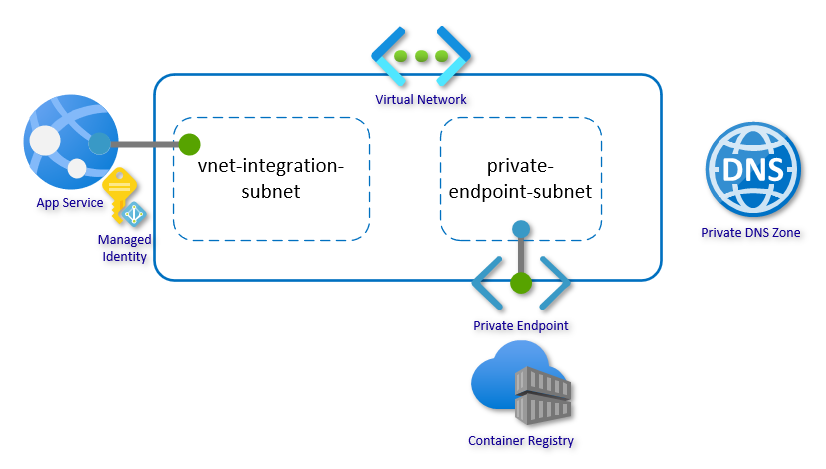
- Use Private Link and private endpoints : For production environments, configure a private endpoint so that registry traffic stays inside your virtual network and does not traverse the public internet. Private Link ensures that clients in a virtual network can access the registry through a private IP address and private DNS resolution. This is one of the most impactful security improvements for any registry handling production workloads.
- Enable customer-managed keys : By default, images and artifacts stored in Azure Container Registry are encrypted at rest using Microsoft-managed keys. For higher compliance requirements, you can enable customer-managed keys using Azure Key Vault to retain full control over encryption.
- Scan container images continuously : Vulnerabilities in container images are a serious risk. Microsoft recommends continuously scanning images pushed to your registry to discover known vulnerabilities in packages or dependencies defined in the container image. Microsoft Defender for Containers can be enabled to provide ongoing vulnerability assessment for images stored in ACR.
- Sign container images : Image signing verifies that the content pulled from the registry is the same content that was pushed by a trusted build process. Microsoft recommends signing images and configuring consumers to verify image integrity on pull. Azure Container Registry supports OCI artifact signing with Notation and Azure Key Vault.
- Apply Azure Policy : Azure provides built-in policy definitions for Container Registry that enforce key security rules across your environment, including encryption with customer-managed keys, restricted network access, and private link usage. Applying these policies ensures your registries stay compliant at scale.
- ACR export policy should be disabled : To prevent registry users in an organization from maliciously or accidentally leaking artifacts outside a virtual network, you can configure the registry’s export policy to disable exports.
- ACR ARM audience token authentication should be disabled : Disabling ARM audience token authentication will force the registry to use ACR audience tokens and will ensure only tokens meant for usage on the registry can be used for authentication.
Network Best Practices
- Deploy the registry close to workloads : Create your container registry in the same Azure region as your container hosts. Network-close deployment reduces latency and lowers network egress costs when pulling images.
Docker images use a layered structure, which means a new node must pull all layers for a given image on first use. Having the registry in the same region makes this initial pull much faster and cheaper.
- Geo-replicate for multi-region deployments : If you deploy containers to multiple regions or your development team is distributed globally, use ACR geo-replication to replicate images to multiple Azure regions. This reduces latency for each region and simplifies registry management.
Geo-replication is available on the Premium tier and supports regional webhooks to notify you when images are pushed to specific replicas.
RBAC Best Practices
Role-based access control is essential for controlling who can push, pull, and manage images in your registry.
- Use Microsoft Entra ID authentication over admin credentials : Avoid using the admin account for routine operations. The admin account is a single shared credential that cannot be audited per user. Instead, use Microsoft Entra ID identities, service principals, or managed identities for all registry access.
- Assign the least privileged role: ACR provides built-in roles for different levels of access. Assign the minimum role required for each identity.
| Role | Purpose |
|---|---|
| AcrPull | Pull images only — suitable for deployment workloads and AKS nodes. |
| AcrPush | Pull and push images — suitable for build pipelines. |
| AcrDelete | Delete images — assign carefully. |
| Owner / Contributor | Full control — limit to administrators. |
- Use managed identities for workloads : For workloads running on AKS, Azure Container Apps, or Azure Functions, configure user-assigned or system-assigned managed identities with the AcrPull role. This avoids storing credentials and removes the need to rotate secrets.
- Separate push and pull identities : Use separate identities for build pipelines (push) and deployment runtimes (pull). This ensures that a compromised deployment identity cannot push new or malicious images.
Availability Best Practices
- Use the Premium tier for production : The Premium tier provides the highest bandwidth, the greatest rate of concurrent read and write operations, geo-replication, and private link support. For production workloads with high image pull volume, the Premium tier improves both performance and availability.
- Enable geo-replication with zone redundancy : For the highest availability, use geo-replication to distribute registry replicas across regions. This means that even if one Azure region has an issue, workloads in other regions can pull images from a local replica. Zone redundancy is available within the Premium tier and provides additional protection against datacenter-level failures within a region.
- Place the registry in a dedicated resource group : Put your container registry in its own dedicated resource group, separate from compute resources like container instances or AKS clusters. This reduces the risk of accidentally deleting the registry when removing compute resources.
Image Management Best Practices
- Use unique tags for deployments : Use unique, immutable tags such as a build ID or Git commit SHA for production deployments. Reusing tags like latest or v1.0 can cause nodes to pull different image versions inconsistently, especially when scaling out. Stable tags like latest are acceptable for base image references in build pipelines, but should never be used in deployment manifests.
- Lock deployed image tags : After deploying a tagged image, set the write-enabled attribute to false to prevent accidental deletion or overwriting. This can be added as a step in your release pipeline.
Use repository namespaces to organise images
Use nested namespaces to separate images by team or product group. This helps manage permissions, apply policies, and keep the registry organised as it grows.Example:
contoso.azurecr.io/platform/base:1.0
contoso.azurecr.io/products/api:v2.3
contoso.azurecr.io/marketing/webapp:218.42- Manage registry size and clean up unused images : Regularly purge untagged manifests and old images to control storage costs. Use retention policies to automatically remove untagged manifests after a specified period, and use az acr show-usage to monitor storage consumption.
- Minimize image size : Smaller images pull faster, use less storage, and reduce attack surface. Use multi-stage Docker builds to include only the necessary runtime components, choose a lightweight base OS, and keep the number of image layers between five and ten for optimal performance.
Summary
Azure Container Registry is a powerful, enterprise-grade container image store when configured properly. Applying best practices across security, networking, RBAC, availability, and image management helps reduce risk, improve performance, and support compliance requirements.