
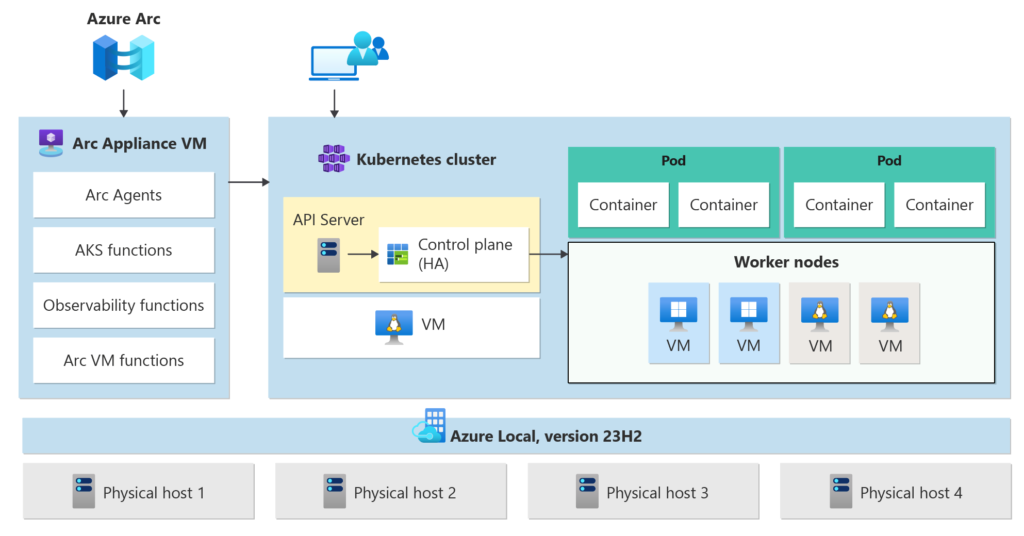
If you’ve been working with Kubernetes for a while, you’ve probably ended up with clusters everywhere — on-prem, AWS, maybe even edge locations.
The real problem isn’t running Kubernetes anymore.
It’s managing it consistently across environments.
That’s exactly where Azure Arc-enabled Kubernetes starts to make sense.
Why I Looked at Azure Arc for Kubernetes?
In most environments I’ve seen, teams already have:
- EKS clusters in AWS
- Some on-prem Kubernetes (VMware / bare metal)
- Maybe AKS for newer workloads
Each of these comes with its own tooling, policies, and operational model.
So the question becomes:
Can we standardize governance without forcing everything into AKS?
Azure Arc answers that by turning your existing clusters into Azure-managed resources.
What Happens When You Connect a Cluster?
When you onboard a Kubernetes cluster to Azure Arc:
- You deploy Arc agents into the cluster
- The cluster establishes a secure outbound connection to Azure
- It shows up as a resource in Azure Resource Manager (ARM)
From that point:
- You can tag it, group it, apply RBAC
- Treat it almost like an AKS cluster (from a control plane perspective)
This is the key architectural idea:
👉 Control plane in Azure
👉 Workloads stay wherever they are
Supported Platforms.
One thing I really like — there’s no vendor lock-in at the Kubernetes layer.
Azure Arc supports:
- Any CNCF-certified Kubernetes distribution
- AWS (EKS or self-managed clusters)
- GCP, on-prem, edge, VMware, etc.
Even lightweight distros (k3s, Rancher setups) are commonly used in real-world scenarios.
👉 This makes Arc more of a management layer, not a Kubernetes platform replacement.
What You Actually Get?
Let’s break down the practical benefits.
1. Centralized Inventory & Governance
You get a single place to:
- View all clusters
- Apply tagging and organization
- Enforce policies
Azure Policy for Kubernetes is a big win here — especially for regulated environments.
2. GitOps as a First-Class Citizen
Arc integrates directly with GitOps (Flux / Argo CD style):
- Declarative configuration from Git
- Cluster onboarding + app deployment automated
- Consistent configuration across environments
This is where Arc becomes more than just “visibility” — it becomes operational control.
3. Azure Security & Compliance Layer
Once connected, you can enable:
- Microsoft Defender for Containers
- Vulnerability assessments
- Security posture management
This extends Azure’s security model outside Azure, which is something AWS/GCP don’t really offer natively across clouds.
4. Observability Without Rebuilding Your Stack
You can plug into:
- Azure Monitor
- Log Analytics
Instead of stitching together Prometheus + Grafana + custom pipelines across environments, you get a centralized telemetry model.
5. RBAC & Identity Integration
You can use:
- Azure RBAC
- Entra ID integration
This is especially useful in enterprises where identity governance is already centralized in Azure.
What About Management Overhead?
This is where people usually get skeptical.
The Reality:
- You are adding agents into the cluster
- You need to manage:
- Arc agents
- Extensions (Flux, Defender, etc.)
- Some features require additional setup (e.g., GitOps, monitoring)
However:
- It’s agent-based and outbound-only, so no inbound firewall complexity
- Once baseline is set, it becomes largely policy-driven and automated
👉 My take:
Initial setup effort is real, but operational overhead reduces over time if you standardize properly.
Cost – The Part Everyone Asks About
This is actually straightforward (and often misunderstood).
What’s Free:
- Connecting Kubernetes clusters to Azure Arc
- Basic control plane (inventory, ARM integration)
What Costs Money:
You pay only when you enable Azure services:
- Azure Monitor
- Microsoft Defender for Containers
- GitOps extensions (indirect cost via resources)
👉 Azure Arc itself is mostly a gateway, not a billing-heavy service
Final Thoughts
Azure Arc-enabled Kubernetes is one of those services that makes more sense the more complex your environment becomes.
If you’re running a single cluster → probably overkill.
If you’re running Kubernetes across multiple environments → this becomes very compelling.
The key takeaway for me:
Azure Arc is not about running Kubernetes.
It’s about controlling Kubernetes at scale — regardless of where it runs.
If you’re already managing multi-cloud Kubernetes environments, I’d strongly recommend trying the onboarding process once. The learning curve is small, but the architectural implications are significant.
References
Here are the official and practical resources you can include at the end of your blog:
- Azure Arc Jumpstart – Kubernetes Onboarding
https://jumpstart.azure.com/azure_arc_jumpstart/azure_arc_k8s/general/onboard_k8s - Azure Arc-enabled Kubernetes Overview
https://learn.microsoft.com/en-us/azure/azure-arc/kubernetes/overview - Connect Kubernetes Cluster to Azure Arc (AKS Arc doc reference)
https://learn.microsoft.com/en-us/azure/aks/aksarc/connect-to-arc
#AzureArc #Kubernetes #HybridCloud #MultiCloud #CloudArchitecture #GitOps #DevOps #CloudNative #AzurePolicy #MicrosoftAzure #PlatformEngineering #Observability #laughingcloud.io