Azure Service Bus is Microsoft’s fully managed enterprise message broker for connecting applications and services with reliable asynchronous messaging. It supports queues, topics, and subscriptions so distributed systems can exchange messages without requiring components to be tightly coupled or always online at the same time.
What Azure Service Bus is?
- At a high level, Azure Service Bus acts as a messaging backbone between producers and consumers. Instead of one application calling another directly and waiting for an immediate response, the sender places a message on Service Bus and the receiving side processes it when ready.
- This model helps reduce tight dependencies between systems and improves resilience when downstream services are slow, unavailable, or processing work at different rates. Microsoft positions Service Bus as a reliable cloud messaging service for enterprise integration, business workflows, and decoupled application architectures.
Why organizations use it?
The main reason to use Azure Service Bus is to decouple systems while keeping message delivery reliable. It is commonly used when multiple applications, services, or background workers need to exchange business messages in a controlled and durable way.
Typical scenarios include order processing, financial workflows, inventory updates, asynchronous task processing, and communication between microservices. In these cases, the sender should not fail just because the receiver is temporarily unavailable or busy.
Core use cases
- Azure Service Bus fits especially well in business-critical messaging scenarios.
- Application decoupling, where front-end systems hand work to back-end services asynchronously.
- Reliable workload buffering, where queues absorb spikes and let workers process messages at their own pace.
- Publish/subscribe messaging, where one event must be distributed to multiple downstream consumers by using topics and subscriptions.
- Workflow coordination, where different services participate in a larger business process and need durable message handoff.
- Hybrid integration, where systems across cloud and on-premises environments need a consistent messaging layer.
Key concepts to understand
- Namespace : A namespace is the top-level container for Service Bus resources. Queues, topics, and subscriptions are created inside a namespace.
- Queue : A queue is used for point-to-point messaging. One sender places messages into the queue, and one receiver or a competing set of receivers processes them.
- Topic and subscription : A topic is used for publish/subscribe messaging. Producers send a message once to the topic, and multiple subscriptions can receive copies of that message for independent processing.
- Dead-letter queue : Every queue and subscription has a dead-letter queue, which stores messages that cannot be delivered or processed successfully. This is important for troubleshooting and replay scenarios.
Design guidance at a high level.
From a Well-Architected perspective, Azure Service Bus should be designed around reliability, security, operational visibility, and the right messaging pattern for the workload. Microsoft’s architecture guidance emphasizes thinking carefully about message size, lock duration, duplicate handling, retries, idempotent consumers, and monitoring for backlog or failed deliveries.
Security is also an important design area. Azure Service Bus supports Shared Access Signature and Microsoft Entra ID authorization, along with network protection options such as IP firewall and virtual network integration. For modern architectures, role-based access and private network controls are generally the preferred direction when possible.
A practical use case: Real-time analytics with Azure Service Bus and Microsoft Fabric.
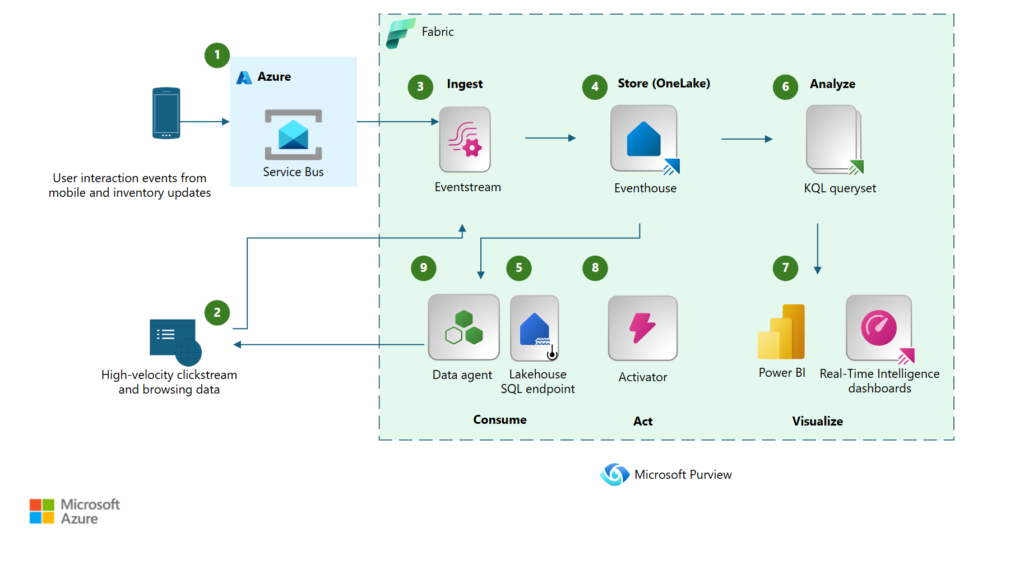
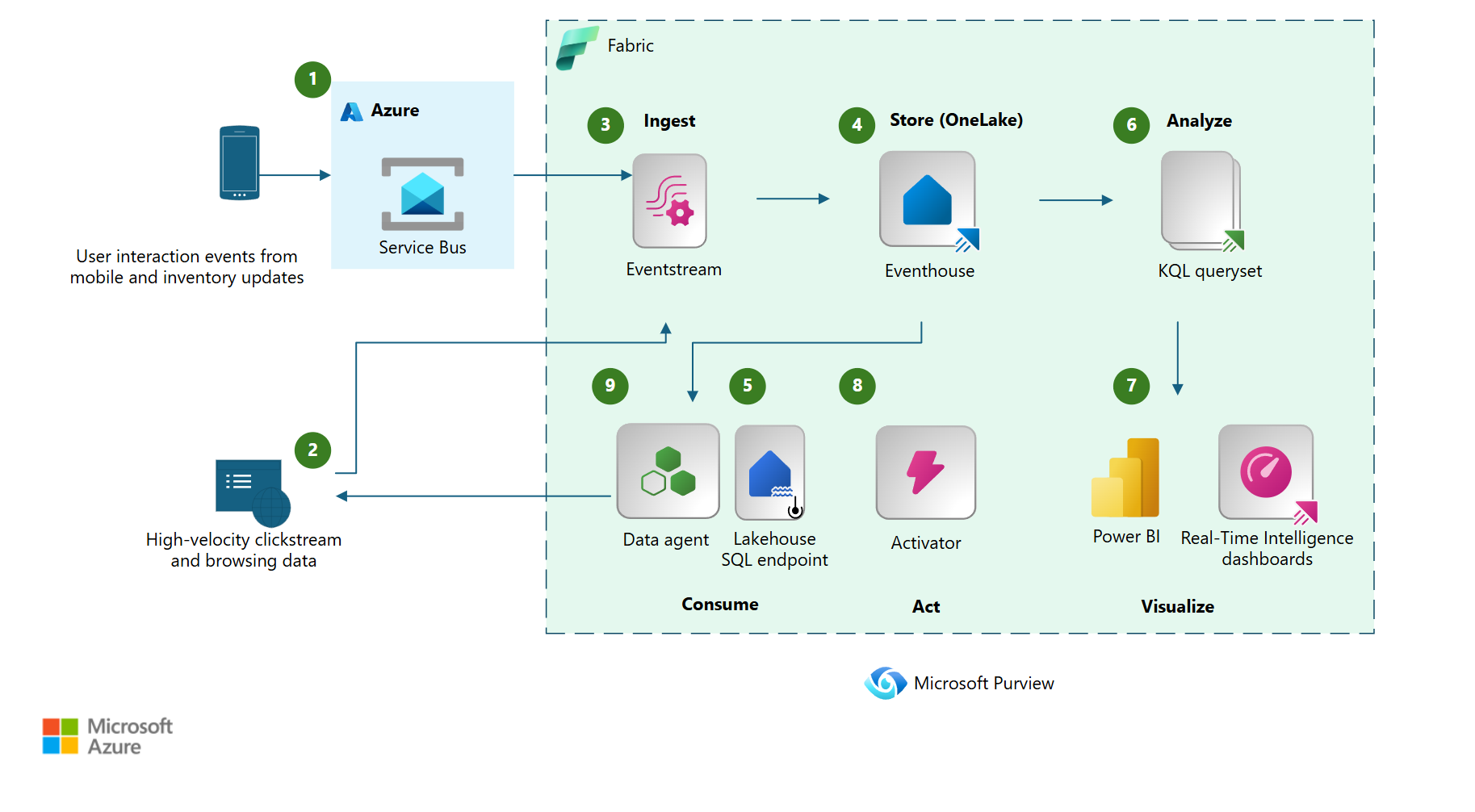
One useful high-level scenario is the Microsoft architecture pattern for near real-time analytics with Azure Service Bus and Microsoft Fabric. In this design, applications send business messages to Azure Service Bus, and those messages are then consumed and streamed into Microsoft Fabric so teams can analyze operational data close to real time.
This approach is valuable when the same business messages must serve two purposes at once: operational processing and analytical insight. For example, order events, support interactions, or process milestones can be sent reliably through Service Bus for workflow execution while also feeding dashboards, streaming analytics, and real-time intelligence experiences in Fabric.
At a high level, Service Bus provides the durable, decoupled messaging layer, while Fabric provides the analytics, visualization, and event-driven insight layer. Together, they support scenarios where organizations want both reliable transaction processing and faster business visibility without forcing production systems to directly power analytics workloads.
When Azure Service Bus is a good fit?
Azure Service Bus is a strong fit when messaging must be durable, asynchronous, and business-oriented. It is especially suitable when the system requires guaranteed delivery patterns, workflow coordination, message ordering, retry handling, and multiple subscribers with independent downstream behavior.
It is less about raw telemetry ingestion at massive scale and more about dependable message brokering between business applications and services. That distinction is useful when choosing between Azure messaging services at the architecture stage.
Final thoughts
Azure Service Bus remains one of the core building blocks for reliable application integration on Azure. It provides a durable messaging foundation for decoupling services, coordinating workflows, and building resilient enterprise systems without forcing direct dependencies between applications.
Reference.
https://learn.microsoft.com/en-us/azure/architecture/solution-ideas/articles/analytics-service-bus
https://learn.microsoft.com/en-us/azure/service-bus-messaging/service-bus-messaging-overview
https://learn.microsoft.com/en-us/azure/well-architected/service-guides/azure-service-bus