Have you ever needed a massive amount of RAM for an enterprise database, only to realize that Azure forces you to buy 32 or 64 vCPUs alongside it?
For workloads running software licensed per-core—such as Oracle Database, Microsoft SQL Server, or specialized enterprise engines—this creates an expensive dilemma: you are forced to pay tens of thousands of dollars for software core licenses you don’t even need, just to get the required memory and disk throughput.
To solve this, Microsoft made two major features generally available: Configurable Constrained vCPUs and Disabling Simultaneous Multithreading (SMT).
Here is an architectural breakdown of what these features do, how they work, and why they matter for your cloud budget.
1. The Core Problem: The “RAM vs. Licensing” Tax.
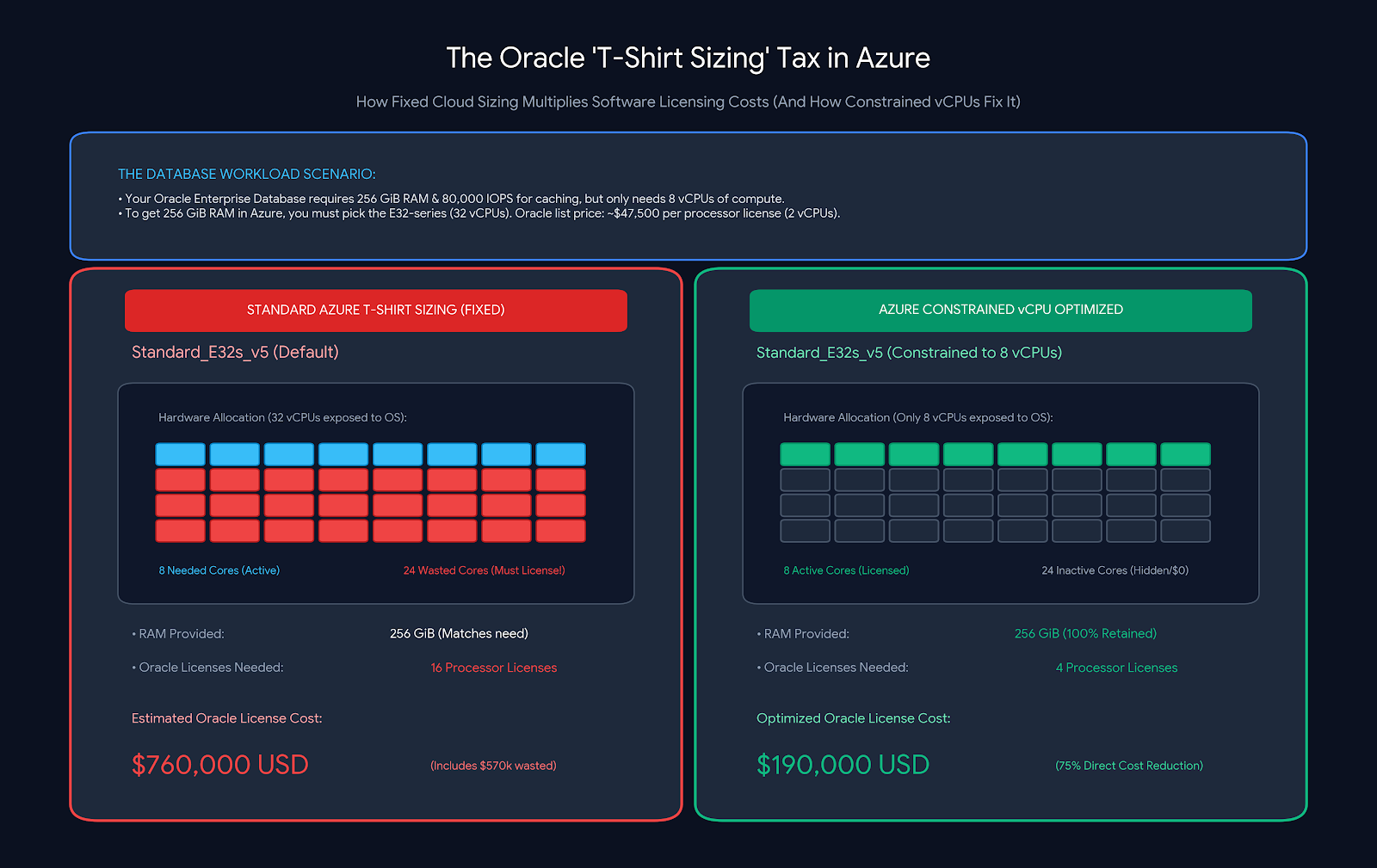
In traditional cloud provisioning, virtual machine sizes are packaged in fixed ratios. If you need 256 GiB of RAM, you might be forced onto a VM with 32 vCPUs.
| What Your Database Needs | What Azure Sizing Forces |
| * 256 GiB RAM * High Disk IOPS * 4 to 8 vCPUs | * 256 GiB RAM (Matched) * High Disk IOPS (Matched) * 32 vCPUs (MASSIVE OVERPAY /24 wasted core licenses) |
If your enterprise database software costs $1,500 to $5,000+ per core, running on that 32-vCPU machine can inflate your software licensing bill by six figures annually—even though those extra cores sit idle.
2. Feature #1: Configurable Constrained vCPUs
Historically, Azure offered static “constrained” VM sizes (like Standard_E16-4s_v5), which gave you an E16 VM with only 4 active cores. But you were locked into whatever fixed combinations Microsoft published.
With Configurable Constrained vCPUs, you can now customize the exact active vCPU count on any supported VM size at deployment or resize time.
How It Works
- You pick the base VM size that matches your memory, storage throughput, and network bandwidth requirements.
- You specify the exact number of active vCPUs you want exposed to the guest OS (e.g., dial a 32-vCPU VM down to 8 active vCPUs).
- The Result: Your guest operating system and database engine only detect and utilize the active count. You keep the full RAM capacity, storage IOPS, and network performance of the larger host, while significantly cutting your per-core database licensing footprint.
3. Feature #2: Disabling Simultaneous Multithreading (SMT).
Most modern cloud processors use Simultaneous Multi-threading (Intel Hyper-Threading or AMD SMT), where a single physical CPU core runs two virtual threads (2 vCPUs) simultaneously.
While multi-threading works well for web servers and general APIs, some compute-heavy workloads struggle when two threads compete for the same physical execution pipeline and L1/L2 cache.
Azure now allows you to disable SMT, configuring the VM to run 1 vCPU per physical core.
Why Disable Multi-threading?
- Eliminate Cache Contention: In high-performance computing (HPC), financial modeling, and scientific simulations, sharing CPU cache between threads introduces latency spikes. Disabling SMT gives each virtual processor exclusive access to the physical core’s full cache and execution resources.
- Predictable Single-Thread Throughput: Single-threaded tasks run faster and deliver consistent, jitter-free execution times.
- Licensing Compliance: Certain software vendors explicitly define a “core” as a physical processor core rather than a virtual thread. Disabling SMT aligns your core architecture with strict licensing audits.
4. The Cost Reality Check: What Changes & What Doesn’t?
It is critical to understand the distinction between Azure compute billing and software licensing savings:
| Cost Category | Impact of vCore Customization |
| Azure VM Base Compute | No change. Azure bills for the underlying hardware allocation (e.g., if you provision an E32s_v5 with 8 active vCPUs, you still pay Azure the base infrastructure rate for an E32s_v5). |
| Third-Party Software Licensing | Massive savings. Third-party per-core licenses (Oracle, SQL Server, IBM) only apply to the active vCPUs reported to the OS. |
| OS Licensing (Windows Server) | May decrease depending on your licensing agreement and active core thresholds. |
The Architect’s Decision Blueprint.
Use this quick checklist to decide when to customize your vCores:
- Use Configurable Constrained vCPUs when: You are deploying memory-intensive, per-core licensed databases (Oracle, SQL Server) and need to maximize RAM/IOPS without overpaying for software licenses.
- Disable SMT when: You are running latency-sensitive HPC, gaming engines, batch simulations, or analytics tasks where single-thread cache throughput matters more than parallel thread density.
- Stick with Standard Defaults when: You run standard web applications, microservices, container hosts, or non-core-licensed open-source software that benefits from maximum thread concurrency.
Reference.
https://learn.microsoft.com/en-us/azure/virtual-machines/vm-customization