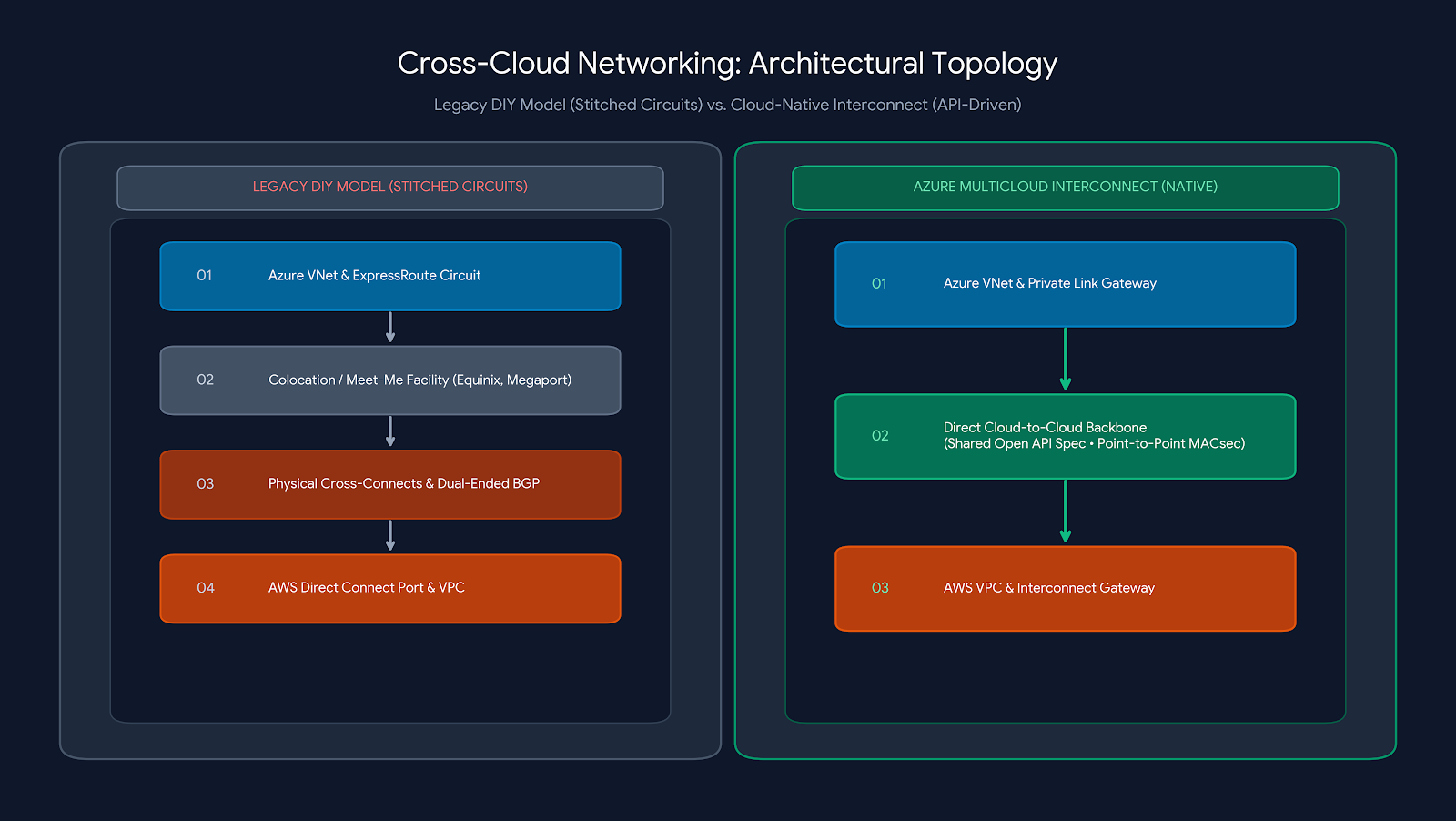
If you have ever attempted to connect an Azure VNet to an AWS VPC privately, you know the architectural tax involved: provision an Azure ExpressRoute circuit, stand up an AWS Direct Connect port, contract a third-party colocation partner (like Equinix or Megaport), negotiate physical cross-connects, wrestle with dual-ended BGP routing, and manage two separate enterprise support queues.
What should be a single architectural statement—“Connect Network A to Network B”—has historically taken weeks of multi-vendor coordination.
Microsoft and Amazon have fundamentally modernized this model with Azure Multicloud Interconnect and AWS Interconnect – Multicloud. Built on an open API specification, the service turns cross-cloud private networking into a direct, native, software-defined workflow.
1. Under the Hood: How It Actually Works
Rather than forcing engineers to stitch together disparate networking primitives, both cloud providers have standardized the cross-connect layer:
- Standardized Open API: Built on an open API specification that standardizes interconnect provisioning, enabling programmatic cross-cloud peering without proprietary vendor lock-in.
- Direct Cloud-to-Cloud Backbone: Traffic stays entirely on private global backbones, eliminating intermediate hardware routers or public internet hops.
- Native Private Link Integration: On the Azure side, connectivity extends natively through Azure Virtual Network Gateways and Azure Private Link, delivering a true end-to-end zero-trust private path.
2. Architectural Spec Sheet
| Feature | Public Preview | General Availability (Target) |
| Max Throughput | Up to 1 Gbps | Up to 100 Gbps (dynamic scaling) |
| Security & Encryption | MACsec point-to-point encryption | MACsec point-to-point encryption |
| Availability Target | Multi-site resilience | 99.99% SLA (Four-Nines) |
| Routing Scope | Local paired regions only | Global cross-region transit |
3. High-Impact Enterprise Use Cases.
Cross-cloud networking is no longer just a disaster recovery fallback. It is becoming the default topology for distributed enterprise workloads:
- Cross-Cloud AI & Model Training Pipelines: Stream terabytes of unstructured training data stored in Azure Data Lake Storage (ADLS Gen2) directly to AWS SageMaker or Bedrock instances without exposing datasets over the public internet.
- Zero-ETL Analytics & Mirroring: Ingest transactional data from Amazon Aurora or RDS directly into Microsoft Fabric OneLake or Azure Synapse for unified enterprise reporting with low, predictable latency.
- Split Multi-Tier Enterprise Architectures: Host containerized web/API tiers in Azure Kubernetes Service (AKS) close to end-users while talking to core legacy databases or ERP systems hosted in AWS over a secure, private pipe.
- Rapid M&A IT Consolidation: Connect newly acquired company environments hosted on AWS to the corporate Azure tenant instantly via API, avoiding multi-month telecommunication procurement cycles.
4. Key Architectural Challenges & Gotchas
While native cloud-to-cloud interconnect eliminates physical plumbing headaches, architects must design around four critical challenges:
- Egress & Data Transfer Costs: Azure waives the interconnect infrastructure fee during preview, and several independent reports on the launch indicate Azure egress is also being waived on this path for the preview period — though that isn’t yet spelled out explicitly on Microsoft’s own pricing docs, so treat it as provisional, not guaranteed. Once General Availability lands with metered, per-port/bandwidth pricing, egress economics change the calculus fast: pushing hundreds of terabytes across clouds can quickly produce unexpected bandwidth billing spikes, so it’s worth budgeting for that shift now rather than assuming preview economics carry forward.
- Overlapping IP Addressing (CIDR Collisions): If your Azure VNet and AWS VPC both use
10.0.0.0/16, the interconnect will not resolve the conflict. You must implement Private NAT Gateways, non-overlapping IP address management (IPAM), or Azure Private Link to bridge conflicting CIDRs. - Dual-Plane IAM & Governance Sync: You are still bridging two completely separate security control planes. Coordinating role-based access control, auditing (Azure Monitor vs. AWS CloudTrail), and Terraform state lifecycles across both providers requires disciplined multi-cloud governance.
- Preview Limitations (Throughput & Scope): The public preview is capped at 1 Gbps and restricted strictly to local paired metropolitan regions. High-throughput production workloads requiring cross-continental routing must wait for General Availability.
5. The Architect’s Preview Checklist
- Provisioning is Two-Sided: Initiate and confirm the connection across both the Azure Portal/CLI and AWS Console using matching connection tokens.
- Validate Metro Alignment: Confirm that your Azure and AWS workloads reside in supported paired local metros before provisioning.
- Benchmark in Sandbox ($0 Fee): Take advantage of the free infrastructure preview to benchmark baseline round-trip time (RTT) latencies and test failover behavior under live simulated loads.
References.
https://azure.microsoft.com/en-us/products/multicloud-interconnect