“Wait, didn’t Microsoft retire Azure Migrate?”
If your organization is scoping out a cloud modernization project this year, you might have heard rumors that Microsoft’s primary cloud assessment tool is dead.
The short answer is yes—but only half of the story.
Azure Migrate Classic—the original, foundational tool restricted almost entirely to basic VMware virtual machine discovery—was officially retired in February 2024. Its departure isn’t the end of the platform; it marks a massive paradigm shift. Microsoft has replaced it with a modernized, AI-integrated, and workload-specific suite of capabilities currently in Preview.
Here is why the death of the “Classic” experience is the best thing to happen to enterprise cloud architecture, and what the new Preview features bring to the table.
The Shift: Classic Infrastructure vs. Modern Intelligence
The retired Classic experience treated migration as a pure infrastructure exercise: count the VMs, map the network dependencies, and suggest a virtual machine size in Azure. It was built for the “Lift and Shift” era.
The Azure Migrate modernized architecture completely redefines migration planning by shifting the focus from IaaS to intelligent modernization and PaaS.
Here are the standout new features you can use right now:
- AI-Assisted Planning (Azure Copilot): Instead of manually building massive Excel spreadsheets, the integrated Copilot agent interprets discovery telemetry and automatically generates executive-level migration plans and sizing recommendations.
- Security & Vulnerability Insights: The platform now cross-references your agentless software inventory against global vulnerability databases. It proactively flags known CVEs, missing patches, and end-of-support operating systems before you migrate them into the cloud.
- Sustainability Tracking: Need to build a business case for the boardroom? New sustainability insights compare your estimated on-premises carbon emissions with projected Azure emissions, allowing you to track and report yearly carbon reductions.
- Trusted Launch Integration: For workloads that must remain as VMs, the new tooling provides end-to-end assessments for migrating legacy Gen2 VMs directly into highly secure Azure Trusted Launch VMs.
The Expanded Migration Scenarios (Source to Target)
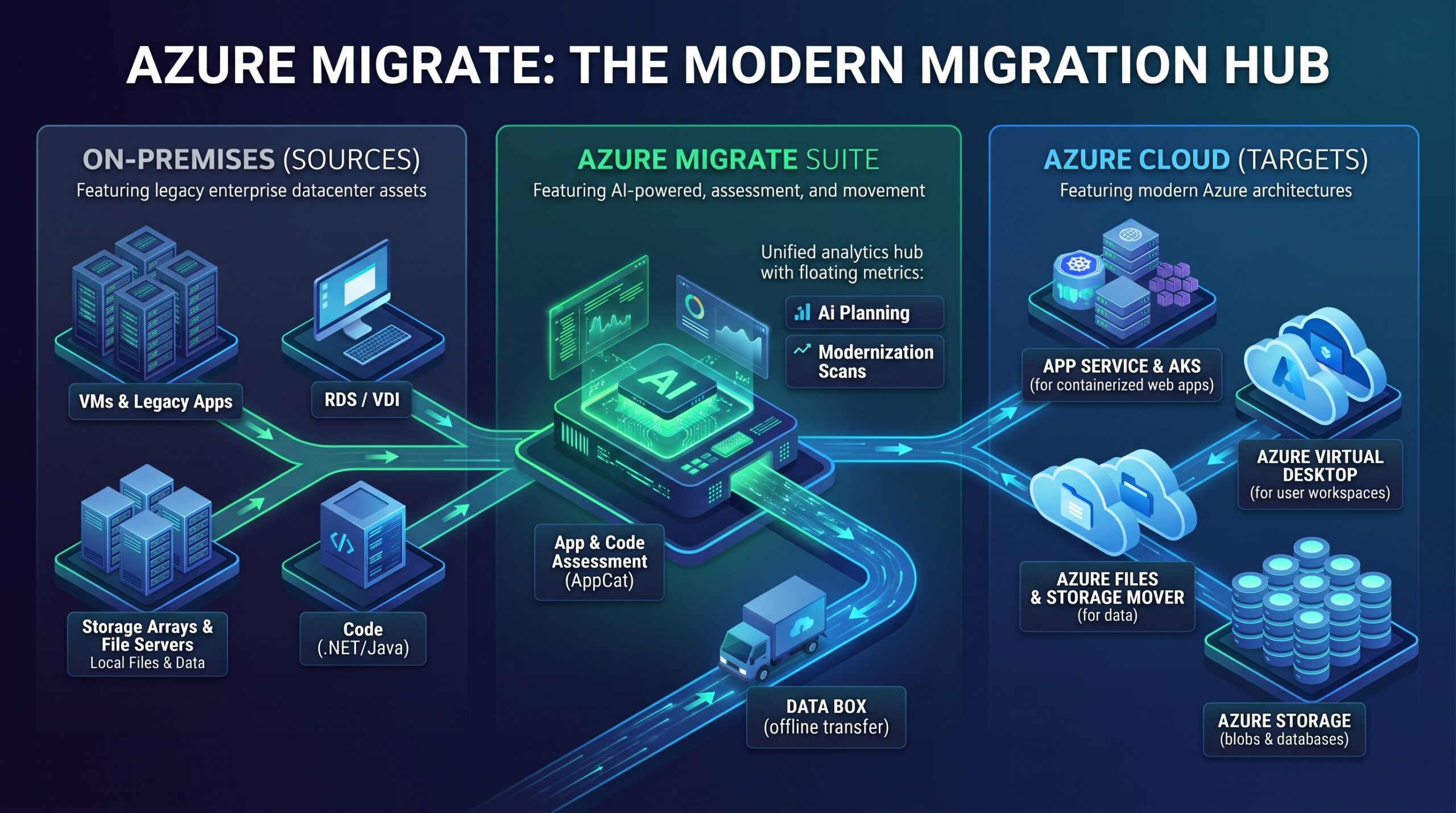
Modern cloud architecture prioritizes managed services, serverless, and containers over legacy IaaS. The expanded Azure Migrate hub reflects this by offering dedicated migration paths for specific workloads, moving far beyond just “VM to VM.”
Here is a high-level breakdown of the current scenarios available, mapping your on-premises sources to their target Azure services:
1. Application Modernization
- Web Apps to PaaS:
- Source: On-premises ASP.NET or Java web applications.
- Target: Azure App Service (Fully managed web hosting).
- App Containerization (Preview):
- Source: Monolithic ASP.NET and Java web applications running on bare metal or legacy VMs.
- Target: Azure Kubernetes Service (AKS) or Azure Container Apps. The tool literally helps you package the legacy app into a container and deploy it to a modern orchestrator.
- Application and Code Assessment (AppCat):
- Source: Legacy .NET and Java source code.
- Target: Cloud-ready code. This scenario scans the actual application code to identify hard coded IPs, unsupported libraries, and required changes before you attempt a PaaS migration.
2. Workspace & Virtual Desktop
- Virtual Desktop Infrastructure (VDI):
- Source: Traditional on-premises Remote Desktop Services (RDS) or legacy VDI farms.
- Target: Azure Virtual Desktop (AVD). A fully managed desktop and app virtualization service that eliminates the need to manage gateway and broker servers.
3. Data & Storage Migration
- Azure Files Migration:
- Source: On-premises Windows Server file shares or NAS devices.
- Target: Azure Files. Fully managed cloud file shares accessible via standard SMB and NFS protocols.
- Azure Storage Mover:
- Source: Local on-premises storage arrays.
- Target: Azure Storage (Blob or Files). This utilizes a fully managed hybrid migration service to orchestrate large-scale data transfers over your network.
- Azure Data Box:
- Source: Massive on-premises datasets (petabyte scale) constrained by low internet bandwidth.
- Target: Azure Storage. Microsoft ships physical, ruggedized storage appliances to your data center. You load the data locally, ship it back, and Microsoft uploads it directly to the Azure backbone.
If you are ripping out legacy VDI, containerizing old Java monoliths for AKS, or shipping petabytes of data via physical appliances, the modernized Azure Migrate is the definitive control plane for your cloud journey.